




SHAREit
Transfer, Share Files
 Affidabile
 4.2.x+

 PEGI-3
Descrizione di SHAREit: Transfer, Share Files
È ora di condividerlo!
Condividi i tuoi file, app, giochi e altro ancora con l'app di trasferimento file SHAREit. SHAREit è un modo super veloce e sicuro per trasferire file di grandi dimensioni. Scelto da oltre 2 miliardi di utenti in tutto il mondo, puoi essere certo che SHAREit è un modo sicuro per condividere i tuoi file.
Con SHAREit puoi anche pulire il telefono per liberare spazio di archiviazione, gestire i file sul telefono, velocizzare il telefono e risparmiare la durata della batteria, aumentare le prestazioni di gioco trasferendo i file della cache di gioco direttamente dal cellulare al PC.
È super facile da usare! E la parte migliore? È gratis!
🔥 Perché devi avere SHAREit, l'app numero 1 per la condivisione di file e il trasferimento dei dati?
🚀
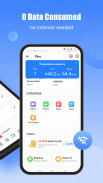
Con 200 volte più veloce del Bluetooth, la velocità massima arriva fino a 42 M/s. Condividi e ricevi file senza alcun consumo di dati, trasferisci file senza alcuna perdita di qualità.
🔒
Se stai cercando un modo per condividere i file in modo sicuro, sei nel posto giusto. Sappiamo che la privacy e la sicurezza dei dati sono importanti, quindi ci assicuriamo che siano protetti nel migliore dei modi mentre ti godi il trasferimento dei file, gratuitamente. Con SHAREit, puoi inviare e condividere qualsiasi file in modo rapido e sicuro, ovunque nel mondo.
👍
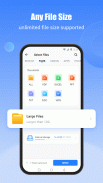
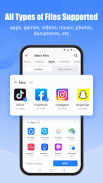
Prova la migliore app per il trasferimento e la condivisione di file senza dati che offre il trasferimento multipiattaforma, supporta tutti i tipi di file e ti semplifica la vita in ogni modo possibile. Non devi più preoccuparti della dimensione o del tipo di dati perché Shareit ti aiuta a inviare file di grandi dimensioni senza limitazioni su tutti i tuoi dispositivi. Trasferisci: app, giochi, foto, film, video, musica, GIF e sfondi con un solo tocco!
🗂️
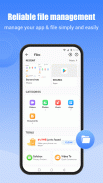
È ora di prendere il controllo del tuo telefono. Il File Manager di facile utilizzo consente di trasferire file, eliminare quelli non necessari e gestire l'archiviazione. Esplora file e gestore ti consentirà di vedere a colpo d'occhio quanti file e app sono presenti sul tuo telefono.
✨
Dì addio ai telefoni lenti e ai file persi. Abbiamo il pulitore di file e il potenziatore di velocità per te. Pulisce la spazzatura, potenzia il tuo telefono, trova i file velocemente e li condivide offline. Con il nostro booster mobile professionale e la pulizia della cache, puoi pulire la cache e liberare così tanto spazio dal tuo dispositivo senza preoccuparti di eliminare il file sbagliato.
📀
Guarda video online ad alta definizione illimitati e trova nuovi contenuti video divertenti e di alta qualità ogni volta che apri l'app.
🎶
SHAREit Music Player è il modo migliore per ascoltare le tue canzoni preferite. È molto più di un semplice lettore musicale: è un lettore audio elegante, potente e facile da usare.
CARATTERISTICHE CONDIVIDI:
: pulisci e gestisci i file più pesanti, sposta i file o eliminali.
: pulisci telefono, pulisci file, libera spazio di archiviazione per le app con la funzione più pulita che include pulizia dei file, pulizia delle app, pulizia della cache di sistema e altro ancora.
: libera più spazio con il booster di memoria e il booster di velocità. Aumenta la velocità e ottieni un'esperienza di gioco più fluida potenziando il telefono.
: velocizza il tuo telefono e risparmia la batteria del telefono.
: una nuova funzione PUBG One Click Transmission: trasferisci in pochi secondi app di giochi di grandi dimensioni, senza dover scaricare il file della cache del gioco.
💡
: SHAREit non accederà ad autorizzazioni irrilevanti per la nostra funzionalità.
Accedendo a:
Posizione, SHAREit può aiutare a scoprire gli utenti nelle vicinanze. Inoltre, è richiesto dal sistema Android per accedere a questa autorizzazione.
Connessione Bluetooth, SHAREit può scoprire gli utenti vicini più rapidamente in modo da connettersi con Mittente/Ricevitore in modo più efficiente.
❤️Scarica SHAREit ora! È lo strumento perfetto per condividere e trasferire file tra dispositivi! Se ti piace, CONDIVIDIlo con i tuoi amici! ❤️
Condividi, guarda e gioca. Tutto il giorno. Con SHAREit.
SHAREit: Transfer, Share Files - Versione 6.25.78_ww
(26-03-2025)

SHAREit: Transfer, Share Files - Informazioni APK
Versione APK: 6.25.78_wwPacchetto: com.lenovo.anyshare.gpsCos'è SHAREit?
SHAREit è una delle app di trasferimento di dati gratuite più veloci nel mondo Android! Potrai utilizzarla per condividere file come app, giochi, foto, video e persino musica da un dispositivo a un altro in maniera rapida e sicura.Come si scarica SHAREit APK?
Per scaricare SHAREit premi il tasto 'Download' in alto e segui i semplici passaggi indicati.SHAREit è un'app gratuita?
Sì, installare SHAREit e utilizzarla è completamente gratuito.Si può usare SHAREit offline?
Sì, puoi utilizzare SHAREit anche senza una connessione internet. I file vengono trasferiti tramite una rete locale creata tra i dispositivi interessati, ciò significa che non sprecherai i tuoi preziosi dati mobili.Qual è la dimensione di SHAREit?
La dimensione di SHAREit dipende dal dispositivo su cui effettuerai l'installazione, ma dovrebbe comunque essere tra 32 e 36 MB.Ultima versione di SHAREit: Transfer, Share Files


Altre versioni
























 3.79
3.79



App nella stessa categoria








Potrebbe piacerti anche...